

WHAT’S NEW
An overview of the differences between the OM5 and OM5ii
Please note although the majority of the features in the OM5ii are the same as the OM5 this guide cannot be used for the previous models.
The OM5 is a very popular camera body for those wanting a small compact camera with plenty of features, and it is much more than an entry level camera, the EM10 fills that space. With the OM5ii introduction the marketing is squarely aimed at the outdoor adventurers and travellers who don’t want to carry around lots of kit, hence the introduction of the new Sand colour. For what it is, it is one of the best cameras on the market.
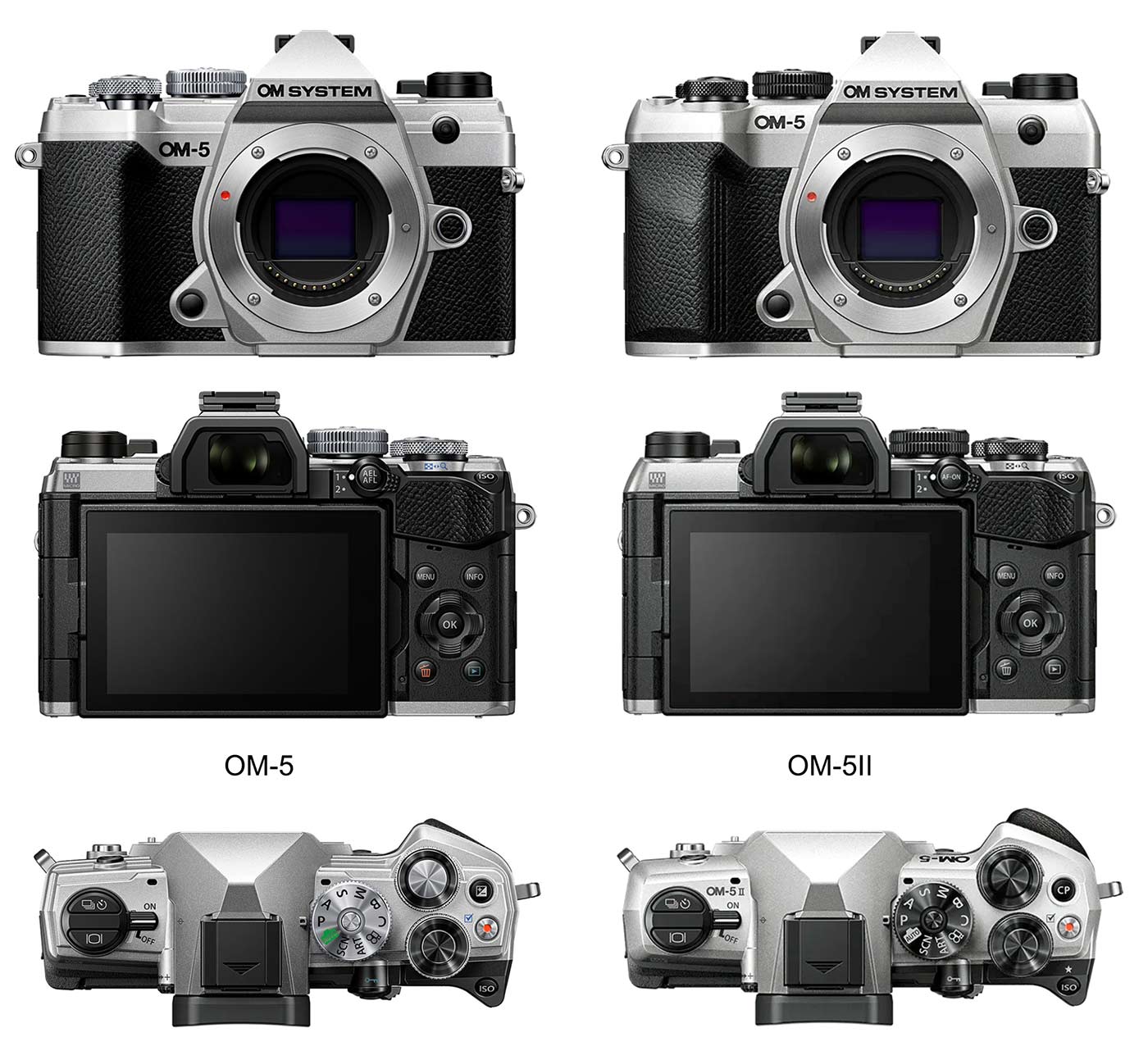
This is not intended to be a forensic comparison of the old and new, after all you are reading this which means you are now the owner of an OM5ii, and there are already plenty of reviews out there and you already did your research. It uses the same sensor, same processor, same EVF and rear screen, so instead of a side by side spec comparison I will highlight what the important differences are.
PHYSICAL DESIGN
At first glance the body is the same, other than the obvious extended grip. The top plate has been simplified by removing some unnecessary chamfers making it more streamlined. There are no new buttons or features on the main dial and Custom Modes still have to be recalled from the C position. However the AEL and Exp. Comp buttons have been repurposed to a new CP button and AF-ON button which is very welcome. Thankfully the Cable Release port has still been retained, it was removed on the OM3 forcing us to buy expensive OM System wireless trigger.
CP AND AF-ON
The CP button first seen on the OM3 is very welcome and in my opinion is a game changer for accessing computational modes. It is actually a very simple change to firmware by grouping all the features onto one and allowing it to be mapped to a button. What it means for us is being able to access the computational modes easily, without having to dive into menus or set up different Custom Modes and button sets.
The AF-ON again is very welcome, it allows us to implement Back Button Focus and set it up so that it is part-time, not always set to BBF. We will discover how this is useful later.
NEW MENU
Finally the new Menu from the OM1 is here. It should have been included in the OM5, but let’s be honest OM System already knew they would release a Mark II because of the lack of USB-C, so in true Apple style it was a feature held back. It is not just prettier and easier to navigate, it also gives a much more useful My Menu and an info popup giving more of a clue as to why a function is not available or greyed out.
USB-C
Finally USB-C is incorporated too rather than the old Micro-USB. It is not just more convenient by needing less types of cables, it also means a battery can be charged in-camera and from a PD Power Bank, useful when on-the-go. It is still only USB 2.0 which is slow by modern standards, so if transferring a lot of images you’re better off with a card reader.
CINEMA 1 & CINEMA 2
Two new colour profiles for video have been inherited from the OM3, Cinema 1 is designed to highlight yellows in the bright parts of your image and blues in the darker areas, while Cinema 2 adds a bit of cyan to the highlights and shadows while lowering contrast.
NIGHT VISION MODE
Also inherited from the OM1 and OM3 Night Vision Mode allows us to better see a scene in the dark. Whilst this is just Live View Boost on steroids, it does actually work quite well. The image is grainy and with subdued colour as you’d expect at night, but it does mean you can compose your scene and focus better in the dark.
HAND HELD ASSIST
Now available on the OM5ii and inherited from the OM1/OM3, Hand Held Assist is another on-screen box with very sensitive levels, designed to show just how steady you are hand holding the camera, especially with longer lenses. It is intrusive and I rarely use it, but always better to have the option than not right?
That’s about it. While there are no new features as such the OM5ii has now been brought up to date which is very welcome.
We can now dive in to learning how to use it.