

OLYMPUS EM5-MK3
Using this Guide for the Olympus EM5-MK3
This is predominantly an Om-System Om-5 Guide, however there are so few differences between the two cameras that the guide can be used also for the EM5-MK3. This section will show the comparisons and outline the differences and what to look for when setting up the EM5-MK3.
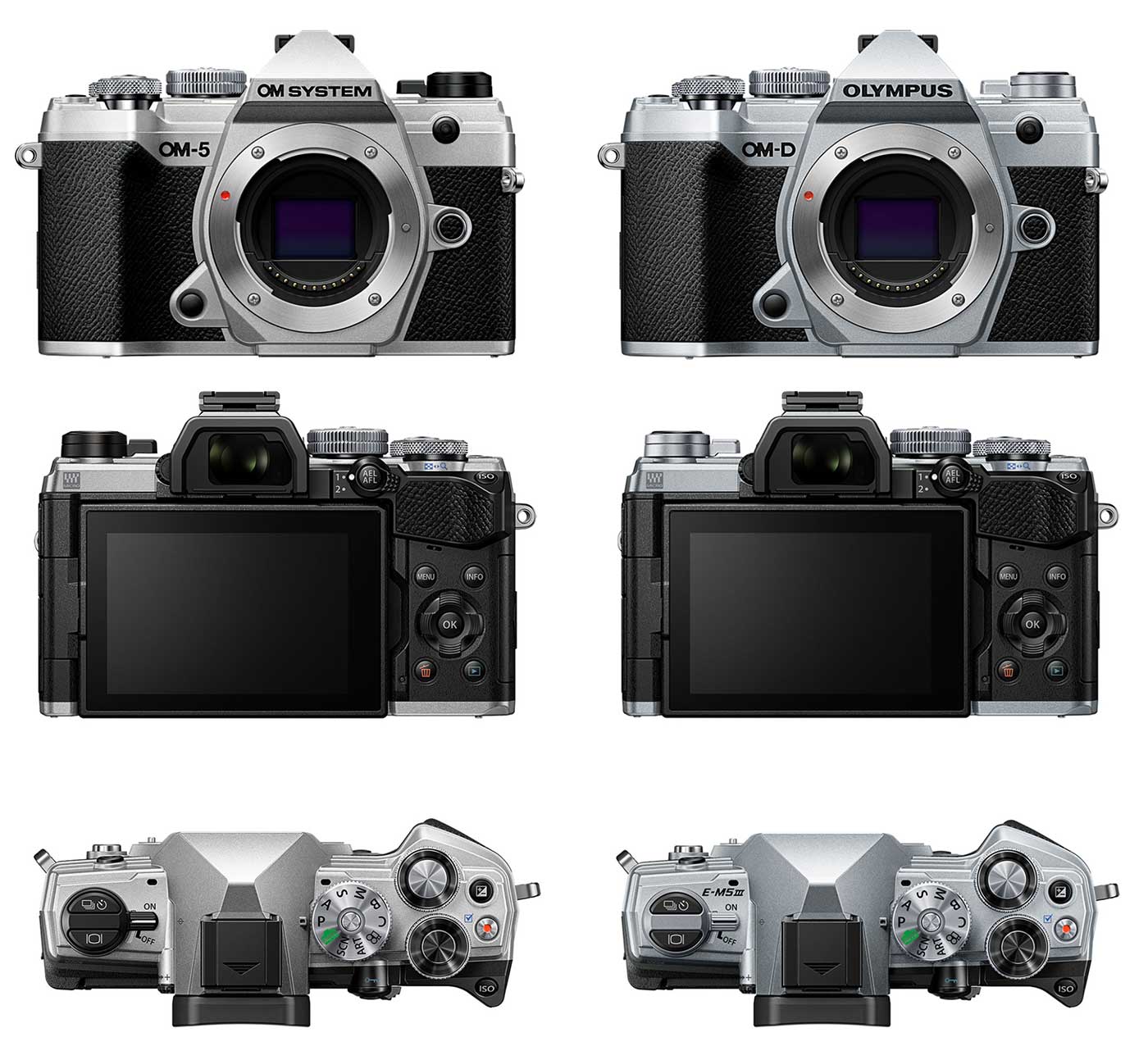
OM SYSTEM OM-5
OLYMPUS EM5-MK3
The OM-5 is the evolution of the EM5-MK3, released of course after OM-System took over from Olympus and it has remained largely unchanged, particularly from the exterior; in fact the only changes are are with some of the functions. It has become almost an EM1-MK3 within an EM5-MK3 body.
Taking a look at the controls and layout we see it is exactly the same with the same button layout and the same Mode Dial options, even the Custom Mode is the same. The way Custom Modes are saved and accessed is different to other models but they are the same for the OM5 and EM5-MK3 . The only real impact is the Customs Modes that are created will need to be a little different depending on what you want to achieve. For instance a CM utilising Live ND is irrelevant for the EM5-MK3 because it doesn’t have Live ND. Custom Modes for the EM5-MK3 are also limited to 3 whilst the OM5 has 4. See the Custom Mode Section
Computational Modes such as Live Time, High Res, HDR, Live Composite and Focus Stacking are applicable to both cameras. The OM-5 performs some of these better because of the new processor.
Live ND. Although there are differences many of the sections in this guide will still apply with the only real difference being the location of a few items in the menus. The only function that will be irrelevant are the use of in-camera Live ND which the EM5-MK3 does not have.
My Menu. The EM5-MK3 lacks the My Menu feature, allowing items to be added to a user menu. References to this will need to be ignored. It is unfortunate because it allows frequently used items to be added as shortcuts. Brain power and memory has to be used.
Custom Modes. The OM5 allows 4 Custom Modes to be created whereas the EM5-MK3 has 3. See below.
COMPARISON
A summary of some of the main features.
| OM-5 | EM5 MK3 | |
|---|---|---|
| Sensor | 20.4 LMOS | 20.4 LMOS |
| Processor | TruePic IX | TruePic VIII |
| EVF | 2.36 M Dot OLED | 2.36 M Dot OLED |
| AF | 121 Phase Detect | 121 Phase Detect |
| Focus Modes | Single AF (S-AF) Continuous AF (C-AF) Manual Focus (MF) S-AF + MF AF tracking (C-AF + TR) Preset MF |
Single AF (S-AF) Continuous AF (C-AF) Manual Focus (MF) S-AF + MF AF tracking (C-AF + TR) Preset MF |
| Art/Scene Modes | Yes | Yes |
| Pro Capture | Yes | Yes |
| Live Time | Yes | Yes |
| High Res Mode | 80MP (Tripod) 50MP (Hand-Held) | 80MP (Tripod) |
| Live ND | 4 Stops | No |
| Other Modes | Live Composite, HDR, Focus Stacking | Live Composite, HDR, Focus Stacking |
| Starry Sky AF | Yes | No |
| Custom Modes | 4 | 3 |
| My Menu | Yes | No |
We can see from this there are so many similarities and very few differences, those main differences being:
- No ‘Live ND’
- High Res Mode – 80mp Tripod Mode but no 50mp Hand Held Mode for the EM5-MK3
- No Starry Sky AF for the EM5-MK3
- Custom Modes are 3 not 4
- No ‘My Menu’
MENU WALK THROUGH
The Menu Walk Through is almost the same and can be followed for the EM5-MK3 just as easily as the OM-5. In fact there are so few items that do not apply a note has been included for convenience.
(EM5-MK3 N/A) next to any menu Item means it does not apply and can be ignored.
BUTTONS / CUSTOM MODES
The sections for setting up Buttons and Custom Modes are also very similar. The first set of settings for buttons I suggest in the section can be followed exactly the same, as can modifying them for other Custom Modes.
Custom Modes are a little different in that one of the Custom Modes I feature is for using Live ND which will not be relevant for the EM5-MK3. However the section also includes suggestions for other Custom Modes which can be used instead.
The EM5-MK3 has 3 Custom Modes that can be created, not 4 as with the OM5. In this case you will need to be more selective with the CM’s you set up. CM’s are personal to you and your use of the camera so each CM I show is a suggestion, you may decide to use all that are available, modified to suit you, or only use one or two.
The theory, the method for setting up, application and recalling of Custom Modes is exactly the same.
TECHNIQUES
The Techniques section covers how to use all of the in-camera features such as Live Time in ‘Long Exposures’ and High Resolution.
Where a particular technique does not apply, such as using Live ND for Long Exposures a note will highlight it to avoid confusion.